

How to Budget for LoRaWAN IoT Projects
LoRaWAN projects can deliver long-range, low-power IoT solutions, but budgeting for them requires careful planning. Here’s a quick guide to help you estimate costs and avoid surprises:
- Hardware Costs: Sensors range from $10 to $350 each, while gateways vary from $38 for basic indoor models to $3,598 for carrier-grade options. Accessories, installation tools, and calibration services add to the total.
- Connectivity Fees: Public LoRaWAN networks typically cost $4–$6 per device annually. For larger deployments, private networks may be more cost-effective.
- Software Expenses: Cloud services like AWS charge for data transmission, processing, and monitoring, with costs depending on usage.
- Maintenance: Budget for battery replacements (every 1–2 years for frequent data transmissions) and unplanned repairs, which can be costly.
- Deployment Costs: Site surveys, labor, and gateway placement can significantly impact your budget, especially in urban areas.
- Contingency Buffer: Set aside 15–20% of your total budget for unexpected costs, like additional hardware or emergency repairs.
Step 1: Define Your Project Scope and Requirements
Getting a clear handle on your project scope is the first step toward accurate cost estimates. By outlining your goals, challenges, and the data you’ll need, you create a foundation for everything – from choosing the right hardware to planning long-term expenses. This clarity ensures you can estimate hardware needs and costs with precision.
Calculate the Number and Type of Devices You Need
The number of devices you’ll need depends largely on what you’re monitoring and where. For example, a single LoRaWAN gateway can handle 1,000 to 5,000 end-devices. However, if your deployment involves frequent data transmissions, you may need to segment your network with additional gateways to avoid packet loss.
Selecting the right sensors is crucial and depends on your specific use case. Let’s break it down:
- Smart buildings: CO2 sensors can help monitor indoor air quality.
- Industrial maintenance: Devices like vibration sensors or the Milesight CT10X Current Sensor (priced between $84.00 and $110.00) can detect motor issues before equipment fails.
- Safety and security: Radar fall detection sensors are ideal for healthcare settings, while water leak sensors are perfect for server rooms.
Since most LoRaWAN sensors last five years or more, it’s important to account for battery replacements. Devices that transmit data frequently may need battery changes every 1–2 years, which can add hidden labor costs over time.
Investing in higher-quality gateways can also save money in the long run. Premium gateways often reduce the total number needed, achieving ratios of 2:1 or even 5:1 compared to lower-cost options.
Roman Nemish, President of TEKTELIC, highlights the importance of quality gateways: “Basestation Radio performance and quality set the Operator Network Cost for 10+ years since they are deployed, as well as customer satisfaction and churn rates”.
Companies like CHOOVIO offer a variety of indoor and outdoor gateways to meet different deployment needs.
Once you’ve nailed down your device count, it’s time to consider how environmental factors will affect gateway placement and network design.
Evaluate Coverage Area and Network Requirements
Planning coverage starts with understanding your deployment environment. LoRaWAN’s range varies significantly based on location:
- Urban areas: 2–5 km
- Suburban areas: 5–15 km
- Rural or line-of-sight areas: 15–30 km
Factors like buildings, interference, and terrain can weaken the signal, meaning urban setups generally require more gateways per square mile than rural ones.
To figure out how far your signals will travel, calculate your link budget. This involves balancing transmit power, antenna gains, system losses, and receiver sensitivity. Keep in mind that higher spreading factors (e.g., SF12 vs. SF7) can increase range but also slow data rates and drain batteries faster. While online coverage calculators can provide a rough estimate, critical projects often require on-site testing with tools like the Milesight FT101 Field Tester, priced at $590.00.
Don’t overlook backhaul connectivity when planning your network. Gateways need a reliable connection to the cloud:
- Ethernet works for fixed locations.
- 4G/5G cellular is ideal for remote sites.
- Wi-Fi is a good fit for campus environments.
If your deployment involves over 20,000 devices, consider running a private LoRaWAN network. Paying monthly fees exceeding $0.30 per device can quickly add up, making a private network a more economical choice. Additionally, better gateway coverage enables the Network Server’s Adaptive Data Rate (ADR) feature, which optimizes device power usage. This can extend battery life and reduce long-term maintenance costs.
sbb-itb-0e600ab
Step 2: Calculate Hardware Costs
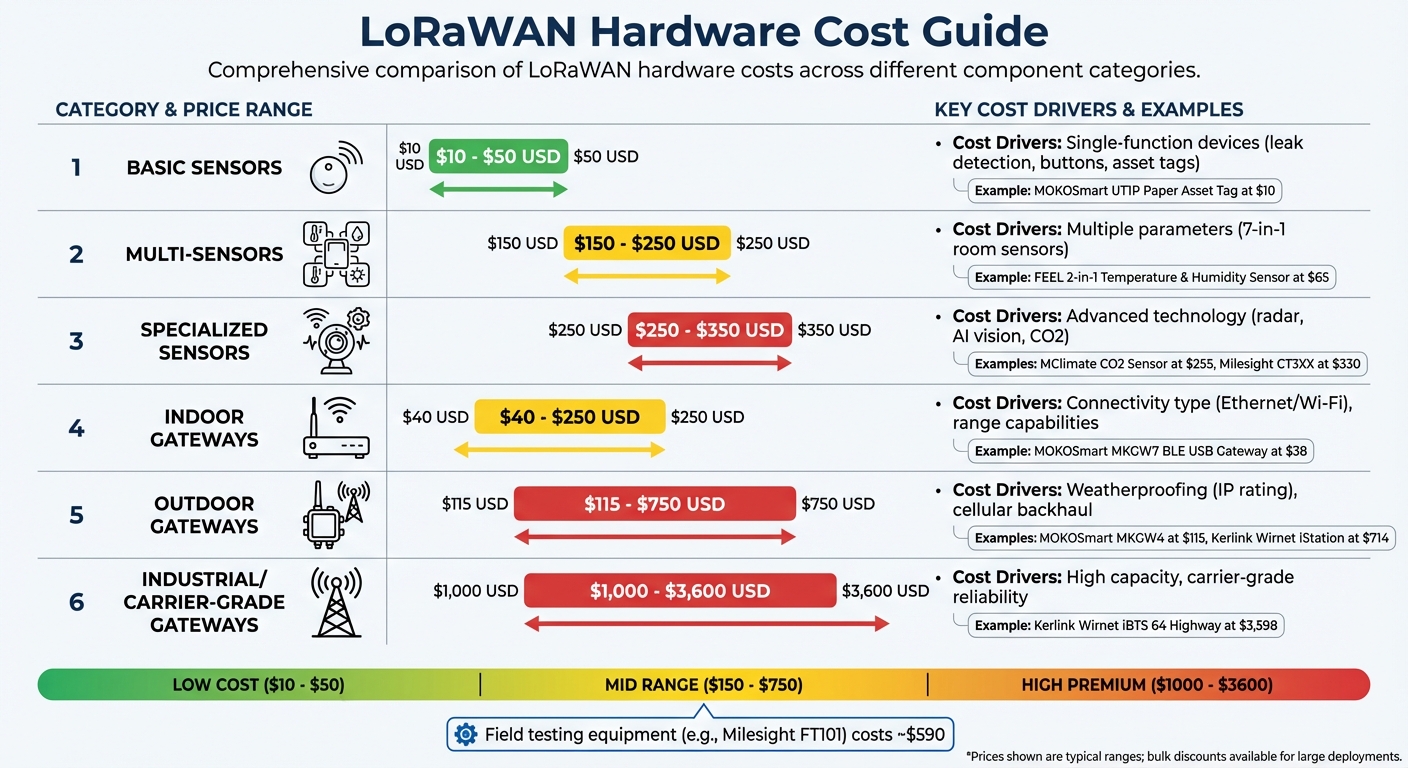
LoRaWAN IoT Project Hardware Cost Breakdown by Component Type
To get your hardware budget right, assign specific costs to each item outlined in your project’s scope. This means researching unit prices, exploring bulk discounts, and including shipping and accessory expenses. Accurate numbers here help you avoid unexpected costs later and ensure clear resource allocation for the next steps.
Estimate Sensor and Gateway Expenses
The cost of sensors and gateways can differ significantly based on your monitoring needs and deployment environment. For instance:
- Basic sensors like the MOKOSmart UT1P Paper Asset Tag start at about $10.
- Specialized sensors such as the Milesight CT3XX Smart Current Transformer can cost up to $330.
- Environmental sensors like the FEEL 2-in-1 Temperature & Humidity Sensor are typically priced around $65.
- Multi-parameter sensors, including the MClimate CO2 Sensor and Notifier, are approximately $255.
Gateway prices also vary depending on their specifications and intended use:
- Indoor gateways, such as the MOKOSmart MKGW7 BLE USB Gateway, start at about $38.
- Outdoor gateways, like the MOKOSmart MKGW4 Outdoor Cellular Gateway, are around $115, while more robust options like the Kerlink Wirnet iStation Outdoor Gateway can cost $714.
- Carrier-grade gateways designed for large-scale networks, like the Kerlink Wirnet iBTS 64 Highway, can reach $3,598.
For larger deployments, bulk discounts can make a big difference. Negotiating directly with distributors can help lower per-unit costs. Don’t forget to include shipping expenses – some providers, like CHOOVIO, offer free standard shipping on orders over $100, which can help manage logistics costs.
Additionally, plan for field testing equipment, such as the Milesight FT101 Field Tester, which costs around $590. These tools are critical for optimizing gateway placement and avoiding costly redeployments.
Budget for Accessories and Installation Equipment
Your hardware budget isn’t complete without accounting for the accessories and installation tools required for deployment. For outdoor setups, this includes mounting brackets, cables, and protective enclosures. For example, outdoor gateways like the Kerlink iStation need weatherproof mounting solutions to endure harsh conditions.
If your project involves sensors requiring high precision – such as those used in food safety or medical fields – allocate roughly $55 per device for calibration services. This ensures your sensors meet necessary standards and provide accurate readings from day one.
For custom configurations, consider provisioning and setup services. These can save time and reduce technical labor costs, allowing your team to deploy more efficiently without needing extensive technical expertise.
| Component Category | Typical Price Range (USD) | Cost Drivers |
|---|---|---|
| Basic Sensors | $10 – $50 | Single-function (leak, button, asset tag) |
| Multi-Sensors | $150 – $250 | Multiple parameters (7-in-1 room sensors) |
| Specialized Sensors | $250 – $350 | Advanced tech (radar, AI vision, CO2) |
| Indoor Gateways | $40 – $250 | Connectivity (Ethernet/Wi-Fi), range |
| Outdoor Gateways | $115 – $750 | Weatherproofing (IP rating), cellular backhaul |
| Industrial Gateways | $1,000 – $3,600 | High capacity, carrier-grade reliability |
Step 3: Plan for Connectivity and Software Costs
Once you’ve accounted for hardware, it’s time to consider the ongoing costs of running your LoRaWAN network. These include connectivity fees for transmitting data and software expenses for managing devices, processing data, and ensuring security. Unlike hardware, these costs recur over time and can significantly affect your overall budget if not properly accounted for.
Estimate LoRaWAN Connectivity Fees
LoRaWAN connectivity is known for being much more budget-friendly than cellular options. With commercial network providers, annual fees typically range between $4 and $6 per device. This affordability is largely due to LoRaWAN’s design, which uses minimal power and transmits small data packets at infrequent intervals.
For private networks hosted through cloud services (e.g., AWS in the US East region), the costs break down as follows:
- Connectivity: Approximately $0.042 per device per year for continuous operation (based on $0.08 per 1,000,000 minutes).
- Messaging: $2.30 per 1,000,000 messages sent or received.
Take a scenario with 500 sensors transmitting data every 15 minutes. This setup would generate roughly 17.5 million messages annually, resulting in messaging fees of about $40 per year.
For larger deployments – say, over 20,000 devices – private networks often become more economical than public services. However, this holds true only if public providers fail to reduce their costs to less than $0.30 per device per month.
Account for Software and Development Costs
Software-related expenses typically account for 40–50% of the initial development budget and 20–25% of ongoing costs. These funds cover tasks like decoding sensor data, integrating with existing systems, and ensuring smooth operation.
Since LoRaWAN devices transmit encoded data, you’ll need tools to decode and process it for actionable insights. Services like AWS Lambda can handle this by routing messages through rules engines to your applications. Be sure to budget for these processing costs. For instance:
- Rules Engine: $0.15 per 1,000,000 triggered rules.
- Device State Operations: $1.25 per 1,000,000 operations.
Additionally, FUOTA (Firmware Updates Over-The-Air) can save you from costly site visits. As TEKTELIC highlights:
“Every truck roll can cost 5–10 times the price of the gateway itself”.
AWS provides the first 100 FUOTA tasks free, with additional charges for subsequent tasks. For monitoring network health, expect to pay $2.00 per 1,000,000 metrics records processed.
Below is a breakdown of typical software costs for AWS services in the US East region:
| Software Component | Pricing (AWS US East) | Usage |
|---|---|---|
| Connectivity | $0.08 per 1M minutes | Continuous device operation |
| Messaging | $2.30 per 1M messages | Data transmissions |
| Rules Engine | $0.15 per 1M actions | Processing and routing data |
| Device Shadow | $1.25 per 1M operations | State tracking for devices |
| Network Metrics | $2.00 per 1M records | Monitoring fleet health |
| Location Services | $0.70 per 1k lookups | GPS-free positioning |
Step 4: Include Deployment, Maintenance, and Hidden Costs
When budgeting for LoRaWAN systems, it’s not just about hardware and software. Operational costs – like deployment, maintenance, and hidden expenses – can unexpectedly inflate your budget. These costs are often the tipping point for staying on track or overspending, so addressing them early is essential.
Plan for Deployment and Installation Expenses
Getting LoRaWAN devices up and running takes more than just plugging them in. You’ll need to account for site surveys, labor, and certifications. In regions like North America and Europe, these costs tend to be higher due to factors like labor rates and site leasing fees.
Installing gateways isn’t always straightforward. Urban areas, with their tall buildings and other obstacles, often require extra effort to ensure proper coverage. This might involve relocating gateways or adding more devices to eliminate coverage gaps. On top of that, you’ll likely need field engineers to test sensors, configure devices, and ensure everything syncs seamlessly with your software.
Another cost to consider is device certification. For example, certifying a custom device can cost around $10,000 per unit, depending on the country. However, investing in high-quality gateways upfront can cut deployment costs by 30–50%. Steven Drewett, CEO of Concept13, sums it up well:
“While cheap imports seem cost-effective initially, their frequent failures, higher replacement rates, and maintenance needs result in costs that are 2-3 times higher over their lifespan.”
Once your devices are installed, the focus shifts to ongoing maintenance.
Budget for Maintenance and Security
The work doesn’t stop after deployment. Maintenance costs – like replacing batteries and labor – are a constant. Most LoRaWAN batteries last only 1 to 2 years, so you’ll need to plan for regular replacements and the labor involved.
Unplanned maintenance can be a major cost driver. TEKTELIC highlights this issue:
“If a gateway fails in year 2 or 3, the replacement event (labor, travel, coordination, downtime) can cost 5–10× the device price.”
For larger deployments, these costs can quickly add up.
Security is another ongoing expense. Encryption, authentication, and regular audits are necessary to protect your network. Using unverified devices can lead to costly “rip-and-replace” scenarios if they fail security checks or are banned by regulators.
With so many variables, having a financial safety net is crucial.
Add a Contingency Buffer
Even the most detailed budgets can’t predict everything. Radio signals may degrade as new buildings go up or as vegetation grows, potentially requiring you to relocate or add gateways. Software bugs that surface after deployment can also be far more expensive to fix than those caught earlier.
To prepare for these surprises, set aside 15–20% of your total budget as a contingency buffer. This reserve can cover unexpected costs like emergency repairs, additional hardware, or unplanned site visits. According to The Things Industries, having a “margin of safety” is particularly important for monitoring and replacing batteries.
This buffer ensures you’re ready for the unexpected, whether it’s environmental changes or unforeseen technical issues.
Step 5: Refine and Finalize Your Budget
Now that you’ve identified the major costs, it’s time to fine-tune your budget. The goal here is to trim unnecessary expenses while ensuring your network remains scalable and efficient.
Apply Cost-Reduction Strategies
One of the easiest ways to cut costs is through smart sourcing. Hardware prices can often be negotiated, especially when purchasing in bulk from distributors. For instance, CHOOVIO offers free standard shipping on orders over $100, which can help reduce shipping costs. Additionally, investing in certified hardware allows for “zero-touch” integration, eliminating the need for manual configuration and troubleshooting – saving both time and money.
Carrier-grade gateways are another smart investment. They reduce the number of deployment sites needed, which can lower hardware costs to less than 3% over a five-year period. Roman Nemish from TEKTELIC highlights the long-term impact of quality hardware:
“Basestation Radio performance and quality set the Operator Network Cost for 10+ years since they are deployed, as well as customer satisfaction and churn rates”.
Improved gateway coverage also enables devices to use Adaptive Data Rate (ADR) features. This not only optimizes battery life but also reduces future maintenance costs. On the software side, look for network servers that offer pay-per-device pricing with no setup fees. This approach keeps initial costs low and ensures your expenses scale predictably as your network grows.
Once you’ve optimized your spending, it’s time to evaluate your returns and prepare for future growth.
Estimate ROI and Plan for Growth
With hardware and software costs mapped out, calculate your return on investment (ROI) to justify future expansion. Compare your total expenses against the benefits, such as improved operational efficiency, reduced labor costs, and energy savings. For larger deployments, consider building a private LoRaWAN network. If monthly connectivity fees exceed $0.30 per device, a private network becomes the more economical choice.
Planning for growth also means locking in fixed hardware costs early through negotiations. This ensures predictable budgeting and smooth scaling. By combining quality investments with strategic cost-cutting measures, you can build a network that’s both affordable and ready for long-term success.
Conclusion
Start by clearly defining your deployment’s scope – how many devices you’ll need and the size of the coverage area. From there, calculate hardware costs, connectivity fees, and any recurring expenses. These foundational steps lay the groundwork for the cost-saving strategies outlined in this guide.
Investing in high-quality gateways may seem expensive upfront, but they pay off by reducing the number of deployment sites and cutting down on long-term maintenance issues. On the other hand, opting for low-quality imports can lead to maintenance problems that might drive up costs by an additional 200% to 300% over the device’s lifespan.
It’s important to remember that hardware costs are just one part of the equation. Expenses like labor, site leasing, and ongoing maintenance can quickly surpass the initial equipment investment. Including a contingency buffer in your budget is a smart move – it can cover unexpected costs like replacing batteries earlier than expected or adding extra gateways. This financial cushion ensures your project stays on track, even when surprises arise.
CHOOVIO provides a wide array of LoRaWAN sensors and gateways engineered for easy integration and cost efficiency. Their products align with the strategies discussed here, offering reliable solutions to manage both upfront and long-term costs effectively.
FAQs
What should I consider when deciding between public and private LoRaWAN networks?
When choosing between public and private LoRaWAN networks, there are three key factors to weigh: cost, control and security, and coverage needs.
Private networks often come with a higher upfront cost due to the need for infrastructure like gateways and servers. However, they can lead to lower long-term expenses since you’re not paying recurring fees to a third party. Public networks, managed by external providers, typically have lower initial costs but may include ongoing usage fees, which can add up over time.
When it comes to control and security, private networks stand out by offering full control over your data, policies, and device management. This makes them a strong choice for sensitive applications, such as healthcare or industrial automation, where privacy is critical. Public networks, while secure, rely on shared infrastructure, which might not align with the privacy requirements of certain applications.
Finally, consider coverage and scalability. Public networks provide extensive regional coverage, making them ideal for deployments that span large areas. In contrast, private networks are better suited for localized or specialized projects, where you can tailor the network’s coverage to fit your exact requirements.
By evaluating these factors, you can determine the right network type for your IoT deployment.
How can I reduce maintenance and connectivity costs for my LoRaWAN IoT project?
Keeping maintenance and connectivity costs under control in a LoRaWAN IoT project is all about smart planning and efficient use of resources. Start by strategically positioning your gateways. The goal is to maximize coverage while using the fewest number of gateways possible. Fewer gateways mean lower hardware costs and less upkeep over time.
Next, focus on selecting durable and cost-efficient sensors and gateways. Look for devices that are built for long-term use, as they can significantly reduce the need for frequent repairs or replacements.
Another way to cut costs is by using centralized management tools. These tools let you monitor and maintain your devices remotely, making it easier to spot and address potential problems before they escalate. Early detection can save you from costly downtime and repairs.
By combining thoughtful planning, reliable equipment, and remote monitoring, you can keep your IoT network running smoothly without breaking the bank.
Why should you invest in high-quality gateways for your LoRaWAN IoT project?
Investing in top-tier gateways can make a big difference in how well your LoRaWAN IoT network performs. These gateways offer stronger coverage, allowing devices to stay connected even in tough or hard-to-reach areas. Plus, they help improve network efficiency by cutting down on data packet loss and ensuring smoother communication.
Another key advantage is the enhanced security features that many premium gateways provide, helping to safeguard your network from potential risks. While they may come with a higher upfront price tag, the payoff includes reduced operational costs, better scalability, and a more reliable IoT setup that’s ready to handle future demands.

