

REST API vs MQTT for IoT Integration
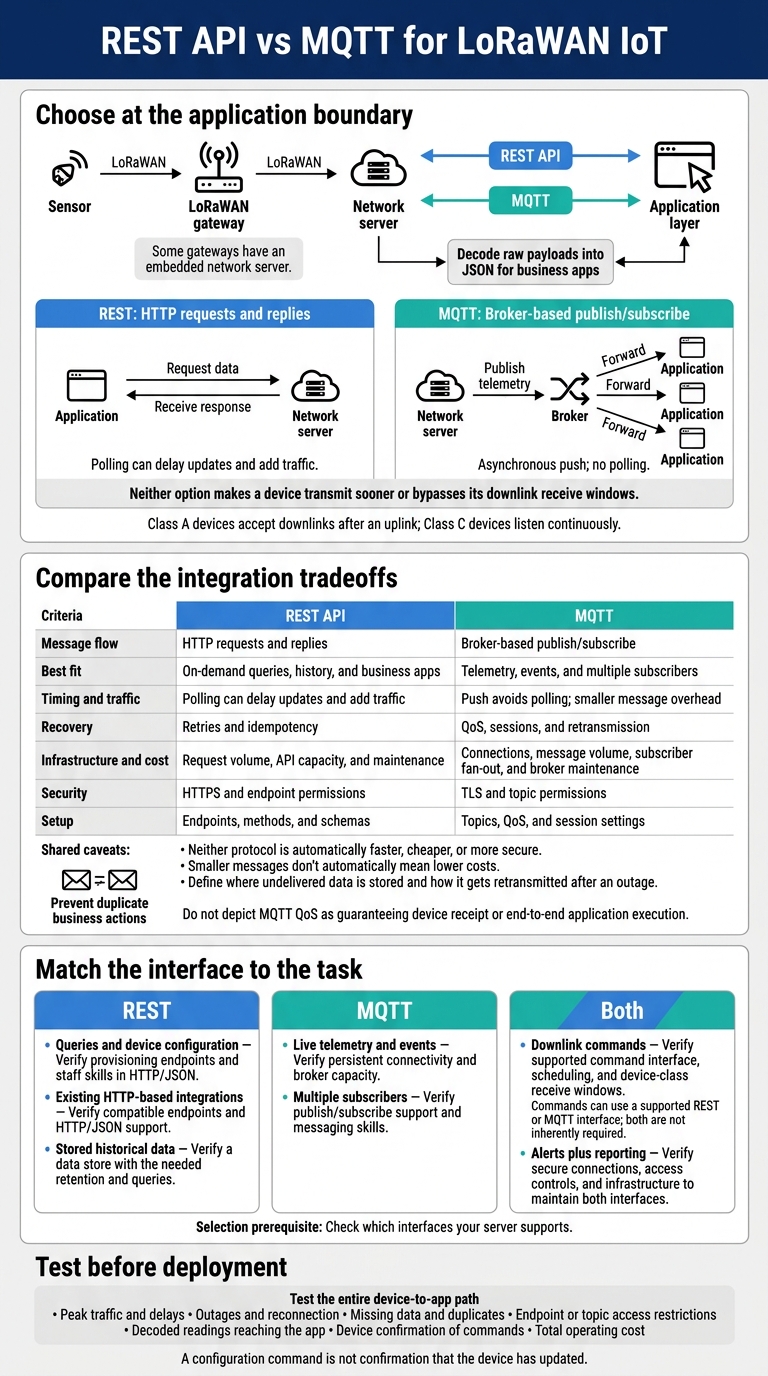
I’d use REST for queries and configuration, MQTT for live telemetry, and both for alerts plus reporting. In LoRaWAN, this choice sits between the network server and your apps – not at the sensor. Neither option makes a device transmit sooner or bypasses its downlink receive windows.
My starting point: check which interfaces your server supports, then compare delivery, security, workload, and total cost.
Quick Comparison
| Criteria | REST API | MQTT |
|---|---|---|
| Message flow | HTTP requests and replies | Broker-based publish/subscribe |
| Best fit | On-demand queries, history, and business apps | Telemetry, events, and multiple subscribers |
| Timing and traffic | Polling can delay updates and add traffic | Push avoids polling; smaller message overhead |
| Recovery | Retries and idempotency | QoS, sessions, and retransmission |
| Infrastructure and cost | Request volume, API capacity, and maintenance | Connections, message volume, subscriber fan-out, and broker maintenance |
| Security | HTTPS and endpoint permissions | TLS and topic permissions |
| Setup | Endpoints, methods, and schemas | Topics, QoS, and session settings |
Smaller messages don’t automatically mean lower costs. I’d also check payload decoding, storage during outages, and duplicate handling. For U.S. CHOOVIO deployments, I’d verify US915 support, device provisioning, and decoder output.
Before choosing, I’d <u>test the entire device-to-app path</u>: peak traffic, delays, outages, reconnection, access restrictions, and device confirmation of commands. That’s how I’d decide whether REST, MQTT, or both meets your needs.
REST API vs MQTT for LoRaWAN IoT
HTTP vs MQTT – Which Protocol Should You Choose for IoT? | NEXTED by Nexaspaces
sbb-itb-0e600ab
How REST APIs Support IoT Integration
REST APIs let business systems request sensor readings or historical data and send configuration changes back to devices. Treat a reading as current only when its timestamp falls within your accepted time window. In LoRaWAN systems, the REST API usually connects the network server to business apps.
HTTP Requests and API Requirements
Start with the documented endpoints, authentication requirements, and payload schemas. Use GET to retrieve telemetry and POST or PUT to send downlink configuration commands. Require HTTPS, and protect API keys or tokens. LoRaWAN payloads arrive as raw bytes, so decode them into JSON before business apps use them.
REST is stateless: each request must carry its own authentication and parameters. But sending a request doesn’t mean a device receives the change right away. LoRaWAN Class A devices receive downlinks after an uplink. Class C devices listen more often but use more power. A configuration command is not confirmation that the device has updated.
REST Strengths and Limits
| Area | REST advantage | REST limitation |
|---|---|---|
| Implementation | Broad software support; straightforward testing with cURL and Postman | Direct device implementations must support the TCP/HTTP stack |
| Bandwidth | Convenient for selective, on-demand retrieval | Headers and repeated polling add traffic |
| Event delivery | Works well when applications request data as needed | Push-like delivery requires another mechanism, such as webhooks or server-sent events |
| Device constraints | Fits application servers, gateways, and powered devices | HTTP processing can burden small, battery-powered endpoints |
| Common tasks | Suits historical reports, configuration, and business-system integration | Less suitable for continuous, high-frequency telemetry |
Before connecting the business app, use cURL or Postman to test authentication, inspect JSON responses, and troubleshoot failed requests. Match polling frequency to the app’s update needs. If events need to arrive promptly, check for webhook or server-sent event support instead of just polling more often.
In LoRaWAN deployments, polling the server does not make the sensor transmit sooner. Data availability still depends on uplink timing. Local storage and retransmission features can help recover missing history after an outage, but the integration must account for delayed records – not assume every returned reading is recent.
How MQTT Supports IoT Integration
REST waits for a request. MQTT pushes telemetry asynchronously, without polling: a publisher sends a message to a broker, and the broker forwards it to subscribers. In LoRaWAN, network servers can publish uplinks and route downlink commands through MQTT to support near-real-time alerts.
MQTT Brokers, Topics, and Connections
Publishers send messages, subscribers receive them, and the broker routes messages by topic. Project- and device-specific topic hierarchies keep uplinks and downlinks organized.
MQTT uses persistent TCP connections and can run over TLS. Some devices buffer messages locally during outages, then retransmit them after reconnecting. Business applications still need converters to decode raw payloads.
These routing rules help determine how reliably LoRaWAN data reaches downstream applications.
MQTT Strengths and Limits
| Area | MQTT advantage | MQTT limitation |
|---|---|---|
| Message flow | One published message can reach many subscribers. | Applications still need broker access and message handling. |
| Topic organization | Topic hierarchies separate projects, devices, uplinks, and downlinks. | Topic schemes must stay consistent across deployments. |
| Recovery | Local buffering and retransmission help preserve data during outages. | Recovery depends on device buffering and reconnection. |
| Payload handling | Converters decode payloads for business use. | Raw payloads must be decoded before use. |
REST API vs MQTT: Side-by-Side Comparison
Neither protocol is automatically faster, cheaper, or more secure. Compare the full data path, not just the protocol. For LoRaWAN, that usually includes the network server, payload decoder, and downstream application.
The table below compares each protocol for LoRaWAN ingestion, command delivery, and downstream app access.
| Area | REST API | MQTT |
|---|---|---|
| Message timing and overhead | Polling can delay updates and add HTTP traffic | Push avoids polling delays and has smaller message overhead |
| Reliability | Application retries and idempotency matter | QoS, sessions, and retransmission matter |
| Infrastructure load | Size API infrastructure for request volume | Size brokers for connections, messages, and subscriber fan-out |
| Security | HTTPS, authentication, and endpoint permissions | TLS, authentication, and topic permissions |
These are integration differences – not guarantees that one protocol will perform better.
Latency, Reliability, and Costs
| Factor | REST API considerations | MQTT considerations |
|---|---|---|
| Delivery controls | Define retry rules and idempotency | Define QoS, acknowledgments, and session behavior |
| Duplicate handling | Keep retries from repeating business actions | Keep redelivery from repeating business actions |
| Cost drivers | Request volume, data transfer, and API maintenance | Broker capacity, data transfer, and topic/session maintenance |
Define where undelivered data is stored and how it gets retransmitted after an outage. Compare operating costs using expected request volume, broker load, connectivity charges, and maintenance. Smaller messages alone don’t guarantee savings.
Beyond speed and cost, check how each protocol controls access and what documentation the integration needs.
Security and Integration Documentation
Document the network server’s integration contract and the decoder’s output for downstream applications. Include:
- Connection and access: Server or broker addresses, ports, protocol versions, authentication, credential issuance, and least-privilege permissions.
- LoRaWAN data mapping: Network-server endpoint or topic naming, payload schemas, and decoder requirements.
- Recovery: Error handling, retry or retransmission rules, session behavior, and duplicate handling for uplinks and downlink commands.
- REST requirements: Methods, endpoint definitions, status codes, request rate limits, and an OpenAPI definition.
- MQTT requirements: QoS settings, publish/subscribe permissions, message quotas, connection limits, and connection acknowledgments or broker errors.
These tradeoffs and requirements guide the choice of REST, MQTT, or both for LoRaWAN.
Choosing REST API, MQTT, or Both for LoRaWAN
LoRaWAN Data Flow and Device Selection
Choose at the application boundary, not the sensor. REST or MQTT connects the network server to the application layer. The sensor still uses LoRaWAN. Some gateways have an embedded network server, so check whether you need a separate LNS.
MQTT can deliver uplinks to applications. Class A devices accept downlinks after an uplink; Class C devices listen continuously. Neither REST nor MQTT bypasses LoRaWAN receive windows.
For CHOOVIO devices, check US915 support, OTAA/ABP provisioning, and a payload decoder that produces JSON. Also confirm that the network server provides the HTTP or MQTT interface your application needs.
Decision Matrix for Business Needs
Match each business task to an interface the server supports. If connectivity is unreliable, check buffering and retransmission – don’t assume either protocol preserves missing readings. Critical local functions should keep working during an internet outage.
Use this table to compare the options. Before implementation, narrow your choice based on the server’s interfaces and your team’s operating skills.
| Business need | Choose | Conditions to verify |
|---|---|---|
| Queries and device configuration | REST | Provisioning endpoints and staff skills in HTTP/JSON |
| Existing HTTP-based integrations | REST | Compatible endpoints and HTTP/JSON support |
| Live telemetry and events | MQTT | Persistent connectivity and broker capacity |
| Multiple subscribers | MQTT | Publish/subscribe support and messaging skills |
| Stored historical data | REST | A data store with the needed retention and queries |
| Downlink commands | Both | Supported command interface, scheduling, and device-class receive windows |
| Alerts plus reporting | Both | Secure connections, access controls, and infrastructure to maintain both interfaces |
Conclusion: Test Before Deployment
REST is request-driven; MQTT is broker-driven. Let measured requirements guide your choice.
After comparing protocol tradeoffs, test the full path under conditions that match production. Check message volume and latency under normal and peak loads. Interrupt connectivity, then restore it to check reconnection and how the system handles missing data and duplicates. Verify credential restrictions on endpoints or topics, and compare total cost.
For CHOOVIO LoRaWAN devices, test the entire device-to-application path. Confirm that decoded readings reach the application and downlinks reach the device. Use those results to choose REST, MQTT, or both.
FAQs
Which MQTT QoS level should I use for LoRaWAN telemetry?
Choose your MQTT Quality of Service (QoS) level based on how reliably your data needs to arrive. The provided documentation names MQTT as the standard protocol for forwarding LoRaWAN network server data to application platforms, but it doesn’t require a specific QoS level.
QoS 0 is generally enough for periodic sensor readings if occasional data loss is acceptable. QoS 1 is recommended when your application needs reliable delivery of critical event-based data.
How can I prevent duplicate alerts when using REST and MQTT together?
Keep data routing and configuration consistent across your network server and application platform. Group or label sensors to simplify data flow. Variable names and keys in decoded payloads must match exactly across REST and MQTT.
Use a single dashboard or rule engine to bring incoming telemetry together and manage alert triggers in one place. This helps prevent duplicate notifications from overlapping data streams.
How do I confirm a downlink command was applied?
Check the status updates and performance metrics your device sends to your central management system or application platform. In LoRaWAN, the network server handles two-way communication and receives the device’s response after a downlink.
Use real-time diagnostics and connection status reports to confirm receipt and configuration changes. For devices such as smart thermostats, local configuration tools can also verify changes directly.

