

Indoor vs. Outdoor Gateways: Key Differences
If your gateway will sit outside, use an outdoor model. If it will stay in a controlled room, use an indoor model. In most cases, the decision starts with the deployment environment.
The choice can come down to 4 things:
- Weather exposure: outdoor units are designed to withstand rain, dust, UV, snow, and wider temperature ranges; indoor units are intended for protected environments
- Coverage: depending on terrain, antenna gain, mounting height, and local RF conditions, an outdoor gateway mounted around 33 ft. can typically cover approximately 0.6–9 miles; and depending on building materials and layout, an indoor gateway can provide coverage across approximately 3–5 floors
- Install work: indoor units are simple to set up; outdoor units often need mounting, grounding, surge protection, and weather-rated cabling
- Cost considerations: indoor gateways can start near $70; outdoor units often start near $400, but in many deployments, one outdoor gateway can cover several times the area of an indoor gateway
If I were choosing for a U.S. site, I’d keep it simple:
- Pick indoor for offices, labs, retail, warehouses, and multi-floor buildings
- Pick outdoor for rooftops, poles, yards, farms, campuses, and utility sites
- Use both when you need broad site coverage and indoor fill-in for basements, garages, or dense concrete areas
A few numbers stand out fast: indoor gateways often cover 3 to 5 floors, indoor signal loss through some building materials can hit 10 to 20 dB, and one referenced deployment achieved a 95.7% packet success rate.
Quick Comparison
| Criteria | Indoor Gateway | Outdoor Gateway |
|---|---|---|
| Best location | Offices, rooms, warehouses | Rooftops, poles, fields, yards |
| IP rating | IP30 to IP54 | IP65 to IP67 |
| Weather handling | Very limited | Built for exposed sites |
| Range | Shorter | Much longer |
| Power | AC, USB, PoE | PoE, cellular, solar + battery |
| Setup work | Low | Higher |
| Starting price | About $70 | About $400 |
| Best fit | Building-focused coverage | Large-site coverage |
Bottom line: I’d match the gateway to the place first, then check range, power, and install work. That keeps the decision clear and avoids using the wrong hardware in the wrong spot.
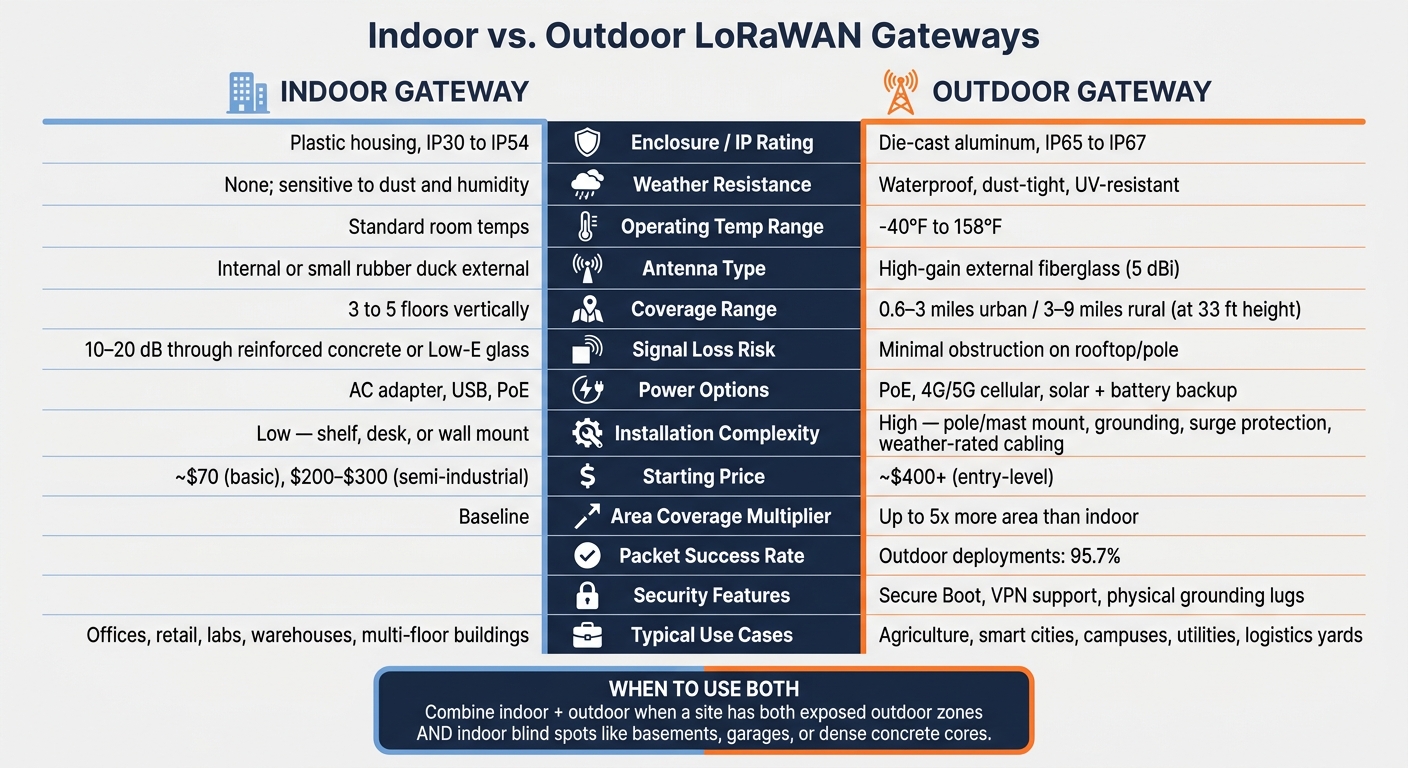
Indoor vs. Outdoor LoRaWAN Gateways: Side-by-Side Comparison
Which LoRaWAN Gateway Is Best For Me (Comparison)? Part 1
sbb-itb-0e600ab
Indoor LoRaWAN Gateways: Designed for Controlled Building Spaces
Inside a building, the priorities change. Weather sealing matters less, while compact size, simple power, and steady coverage matter more. Indoor LoRaWAN gateways are built for climate-controlled spaces where easy mounting and a small footprint are a better fit. They aren’t weatherproof, and their vented enclosures help with cooling, which makes them a natural choice for a shelf, desk, or wall mount.
Hardware, Power, and Connectivity
Most indoor gateways come in vented enclosures with IP30 to IP54 protection. That setup works well indoors, but not everywhere inside a property. Hot attics and unconditioned utility rooms can trap heat, so they’re best avoided.
Power is usually straightforward. Common options include:
- 120V AC through a DC adapter
- USB
- PoE
For backhaul, these gateways usually connect through Ethernet (RJ45) or Wi-Fi, which keeps installation fairly simple.
Coverage Limits and Common Use Cases
A single indoor gateway will often cover 3 to 5 floors vertically. But building materials can chip away at that range fast. Reinforced concrete, elevator shafts, and Low-E glass can add 10 to 20 dB of loss. That’s a big deal in practice. Put the gateway in the center of the building, and coverage is usually more even. Put it near a window, and you can end up with blind spots on the far side of the building.
In CHOOVIO deployments, indoor gateways support monitoring for temperature, humidity, CO2, occupancy, and motion. They’re also useful for filling dead zones in places like basements and underground parking garages, where signals from outdoor gateways often can’t make it.
Those limits are a sharp contrast with how outdoor gateways are built.
Outdoor LoRaWAN Gateways: Built for Wide-Area and Harsh Conditions
Outdoor LoRaWAN gateways are made to cover large spaces across rooftops, poles, towers, fields, yards, and campuses. They use sealed IP65–IP67 enclosures, UV-resistant materials, and external antennas so they can handle rain, snow, dust, and constant sun. Most outdoor gateways are rated for -40°F to 158°F, though ratings vary by manufacturer. That kind of exposure changes the whole setup, from installation to power to coverage.
Cooling is passive. In plain terms, the enclosure itself helps shed heat. A die-cast aluminum housing dissipates heat without fans, which helps avoid fan-related failures in rough outdoor conditions.
Rugged Design, Power, and Backhaul Options
Installing an outdoor gateway takes more work than putting up an indoor unit. These devices usually need pole or mast mounting, grounding, surge protection, and weather-rated cabling with drip loops. It’s not just “mount and plug in.” The site has to be built for weather and electrical risk.
Power and backhaul are where outdoor gateways give you more options. PoE is common for rooftop and pole installs because one cable handles both power and data. That can cut the cost and hassle of running high-voltage lines up a mast. When wired backhaul isn’t there, 4G/5G cellular can fill the gap. And for remote spots, off-grid setups can run on solar with battery backup.
Coverage Range and Field Use Cases
Height makes a huge difference. A single outdoor gateway mounted at 33 feet (10 meters) with a 5 dBi antenna can cover about 0.6–3 miles (1–5 km) in dense urban areas and 3–9 miles (5–15 km) in open rural terrain. That mix of elevation and antenna gain is what makes outdoor gateways a good fit for large or spread-out U.S. deployments.
You’ll see them used across:
- agriculture
- utilities
- logistics yards
- municipal infrastructure
- environmental monitoring
Outdoor deployments have reached a 95.7% packet success rate. That performance gap helps explain the side-by-side comparison that comes next.
Indoor vs. Outdoor Gateways: Side-by-Side Comparison
Indoor and outdoor gateways differ most in protection, range, and install effort. In practice, the biggest gaps show up in enclosure strength, RF reach, setup work, and long-term cost.
The table below compares the main tradeoffs.
| Feature | Indoor Gateway | Outdoor Gateway |
|---|---|---|
| Enclosure / IP Rating | Plastic; IP30 to IP54 | Die-cast aluminum; IP65 to IP67 |
| Operating Environment | Controlled indoor spaces | Exposed outdoor conditions |
| Weather Resistance | None; sensitive to dust and humidity | Waterproof, dust-tight, UV-resistant |
| Antenna Type | Internal or small “rubber duck” external | High-gain external fiberglass |
| Coverage Range | Shorter indoors | Much farther outdoors |
| Power Options | Standard AC adapter or PoE | PoE or solar with battery backup |
| Installation Complexity | Simple; shelf, desk, or wall mount | Complex; pole or mast mount with grounding |
| Maintenance Needs | Low; easy physical access | Moderate to high; site visits or remote monitoring |
| Typical U.S. Use Cases | Smart offices, retail, labs, warehouses | Smart cities, agriculture, oil & gas, campuses |
Protection, RF Performance, and Installation Complexity
Start with the enclosure, because that choice affects almost everything else. Outdoor gateways use sealed metal housings to deal with weather and help move heat away from the electronics. Indoor units don’t need that level of protection because they sit in controlled spaces.
RF performance is where the gap often gets hard to ignore. Indoor signals can lose 10–20 dB when passing through reinforced concrete or Low-E glass. That’s a big hit. Put an outdoor gateway on a rooftop, and it avoids much of that obstruction. The result: it can cover up to five times the area of an indoor unit.
The catch is installation. Indoor gateways are usually easy to place on a shelf, desk, or wall. Outdoor setups take more work, including mounting, grounding, and using weather-rated cabling.
Infrastructure, Cost, and Lifecycle Tradeoffs
Indoor gateways are less expensive and simpler to roll out. That makes them a good fit when coverage areas are small or when you need to get a site live without much setup work. Basic indoor models start at about $70, while semi-industrial units usually land in the $200–$300 range.
Outdoor gateways cost more at the start, but they can cut the total unit count for larger deployments. Entry-level outdoor units start around $400, and pro-grade models cost more. So the math isn’t just about the price of one box. It’s also about how many gateways you need to cover the full site.
Security and Compliance Considerations
Outdoor deployments also face more tampering risk. Because the hardware is easier to reach, pro outdoor gateways may include features such as Secure Boot, VPN support, and physical grounding lugs for lightning protection.
There’s also a code side to this. In the U.S., outdoor installs must meet local grounding and lightning-protection rules. That means the deployment plan has to account for more than signal coverage alone.
Those tradeoffs lead straight to the decision between indoor, outdoor, or mixed deployments.
How to Choose the Right Gateway and When to Use Both
After looking at protection, range, and cost, the choice usually comes down to exposure. Controlled indoor spaces tend to work best with indoor gateways. Exposed sites usually call for outdoor gateways.
When an Indoor Gateway Is the Better Fit
An indoor gateway makes sense when sensors stay inside one building, or across a few nearby floors, and Ethernet or PoE is already available. That setup is often the simplest path when the space is contained and easy to wire.
Once the site stretches past those limits, the tradeoff changes. More distance, more obstacles, or more spread-out devices can make an indoor gateway a poor fit.
When an Outdoor Gateway Is the Better Fit
An outdoor gateway is the better fit when devices are spread across open ground, rooftops, yards, or fields. In those cases, you need hardware that can handle weather and reach farther.
Avoid placing a standard indoor gateway in a sealed NEMA enclosure unless the manufacturer specifically supports that deployment, as heat buildup and antenna losses can reduce performance.
Conclusion: Key Decision Points
For most deployments, it makes sense to start with an outdoor gateway as the main base, then add indoor units only where blind spots show up, such as basements, underground garages, or dense concrete cores. Use both when a site includes protected indoor areas and exposed outdoor zones.
Match the gateway to the site with these criteria:
- Primary environment: Is the deployment indoors in a controlled space, or outdoors in an exposed one?
- Coverage shape: Are devices grouped inside one building, or spread across a large site?
- Weather exposure: Will the gateway deal with rain, UV, and sharp temperature swings?
- Available power and backhaul: Do you have Ethernet or PoE on-site, or do you need cellular failover?
- Maintenance access: Can your team get to the unit easily, or will every service visit need a truck roll?
FAQs
Can one gateway cover my whole site?
It depends on your site layout, your surroundings, and anything that gets in the way of the signal.
In open rural areas, one well-placed outdoor gateway can cover a long distance, sometimes up to 10–15 km.
In dense urban areas or large industrial sites, materials like reinforced concrete and metal can weaken the signal. Hard-to-reach spots can cause trouble too. In those cases, you may need multiple gateways or extra indoor units to get rid of dead zones.
When should I use indoor and outdoor gateways?
Use outdoor gateways when you need steady, wide-area coverage from rooftops, masts, or poles. They’re the right fit for places where the device will face rain, dust, and swings in temperature.
Use indoor gateways when sensors are clustered inside protected spaces like server rooms, labs, warehouses, or smart buildings. They also work well for filling coverage gaps in concrete-heavy spots like basements or underground garages.
What makes outdoor gateway installation more complex?
Outdoor gateway installation is tougher than an indoor setup because the equipment has to deal with weather, exposure, and the quirks of the site itself.
That means using IP65- or IP67-rated enclosures for weather protection, mounting the gateway securely on poles or rooftops, and putting in proper grounding, lightning protection, and surge protection.
The details matter too. You need weather-resistant cabling, plus drip loops to keep water from getting into the system. Antenna placement also needs care, since the goal is to improve signal coverage while keeping cable signal loss as low as possible.
There’s also the practical side: site access can make maintenance harder and more expensive.

