

LoRaWAN Gateways for Scalable Deployments
If I expect a LoRaWAN network to grow, I start with a multi-channel gateway. Single-channel gear is fine for a lab or tiny pilot, but once device count and message traffic go up, the limiting factor is usually capacity, not just range.
Here’s the short version:
- Single-channel gateways fit lab tests and very small pilots
- Indoor gateways fit offices, hospitals, warehouses, and single-building coverage
- Enterprise multi-channel gateways fit campuses, plants, and larger indoor or mixed sites
- Outdoor carrier-grade gateways fit rooftops, poles, towers, cities, and rural coverage
When I compare gateway types, I look at four things first:
- Coverage: varies significantly by gateway, antenna placement, terrain, building materials, interference, and line of sight. Some outdoor gateways specify up to 1.2 miles (2 km) in urban areas and 9.3 miles (15 km) in favorable rural conditions.
- Capacity: multi-channel gateways can support hundreds to low thousands of devices, depending on reporting intervals, spreading factors, payload sizes, channel utilization, and downlink traffic.
- Backhaul: Ethernet, Wi-Fi, and LTE all matter, especially for remote or off-grid sites
- Durability: indoor IP30 units belong in protected spaces; outdoor units usually start at IP65/IP67
In plain terms: buildings need placement and overlap, campuses need a mix of rooftop and indoor coverage, cities need density and backhaul redundancy, and rural sites need height, power, and LTE. Where uptime is critical, I’d consider overlapping gateway coverage to reduce the impact of dead zones or a single gateway failure.
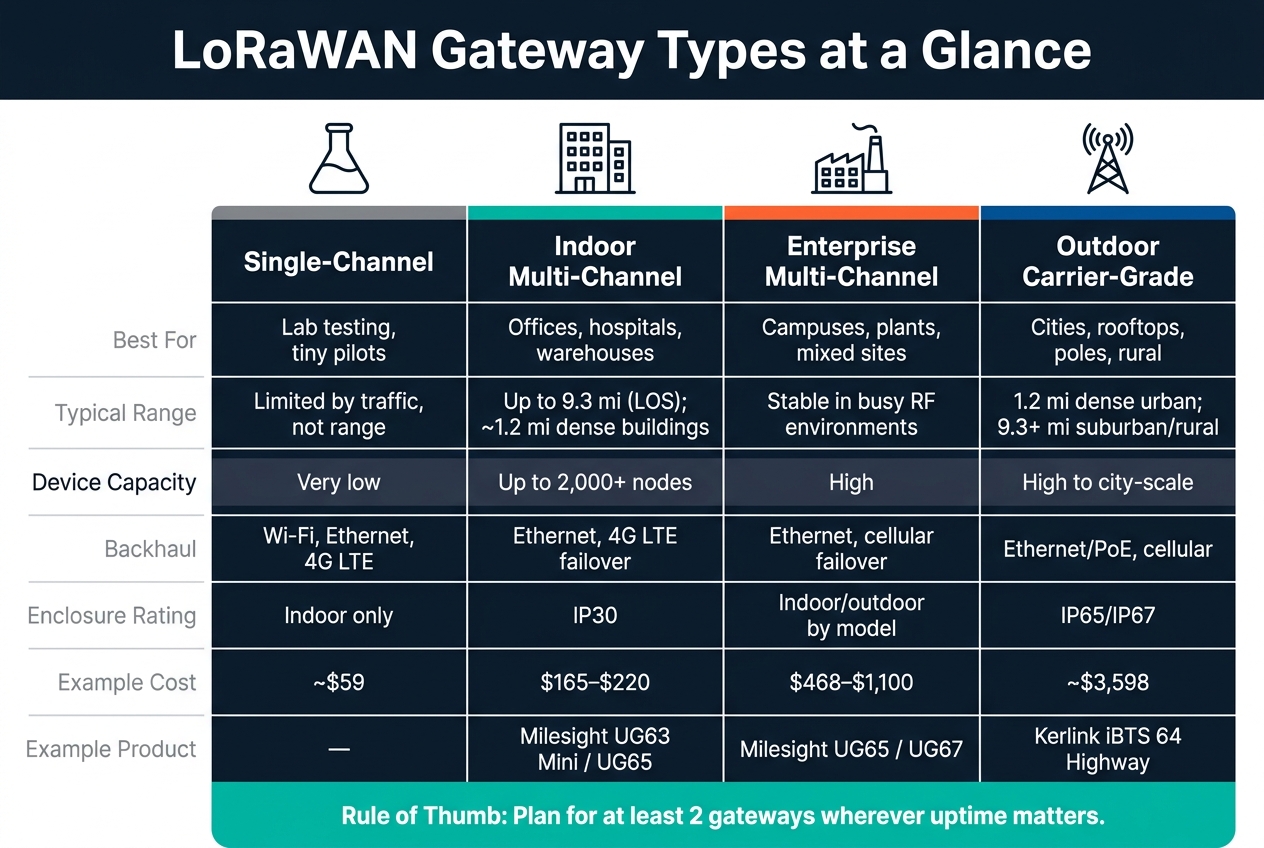
LoRaWAN Gateway Types: Coverage, Capacity & Use Cases Compared
How to Build a Multi-Gateway LoRaWAN® Network (Step-by-Step Guide)
sbb-itb-0e600ab
Quick Comparison
| Gateway type | Best fit | Typical range | Device load | Backhaul | Housing |
|---|---|---|---|---|---|
| Single-channel | Lab testing, tiny pilots | Limited by traffic before range | Low | Wi-Fi, Ethernet, LTE | Indoor |
| Indoor gateway | Offices, hospitals, warehouses | Model and environment dependent; walls, floors, metal, and other obstructions can significantly reduce coverage | Up to 2,000+ | Ethernet, LTE failover | IP30 |
| Enterprise multi-channel | Campuses, plants, mixed sites | Steadier in busy RF areas | High | Ethernet, cellular failover | Indoor/outdoor by model |
| Outdoor carrier-grade | Cities, poles, rooftops, rural | Model and site dependent; some outdoor gateways specify up to 1.2 miles (2 km) urban and 9.3 miles (15 km) rural | High to city-scale | Ethernet/PoE, cellular | IP65/IP67 |
A few product examples in the article help show the spread: the Milesight UG63 Mini and Milesight UG65 for indoor use, and the SG50 Solar Gateway for off-grid sites.
If I had to boil the full article down to one point, it would be this: the right gateway is the one that matches your site size, traffic load, backhaul options, and install conditions before the network gets bigger.
1. CHOOVIO LoRaWAN Gateway Portfolio
CHOOVIO’s gateway lineup runs from small indoor units to outdoor carrier-grade gateways. That range lines up with the deployment tiers used throughout the rest of the article. The next sections look at these classes in more detail: single-channel, multi-channel, indoor, and outdoor setups.
Coverage
Indoor gateways are meant for buildings and nearby outdoor space. Carrier-grade outdoor gateways push coverage much farther, which makes them a fit for rooftops, towers, and large urban areas.
Capacity
Additional receive channels generally provide more traffic-handling headroom, but practical capacity also depends on spreading factor, reporting interval, payload size, channel utilization, and downlink traffic. In plain English: more channels usually means a gateway can deal with more traffic.
For buildings and campuses, 8- to 10-channel gateways are often enough. The Milesight UG65 supports 8 channels and more than 2,000 nodes, which makes it a strong fit for building and campus deployments. At the other end of the range, city-scale deployments need much more headroom.
Backhaul
Indoor gateways usually connect through Ethernet or PoE. Remote locations often depend on cellular. And if the site is off-grid, power becomes just as important as connectivity.
That’s where the SG50 Solar LoRaWAN Gateway stands out. It combines solar power, a built-in battery, and 4G cellular backhaul for places without grid power or wired internet.
Ruggedness
Protection ratings vary by model. The Milesight UG63 Mini has an IP30 rating and is designed for protected indoor environments, while models such as the UG65 provide higher IP65 protection. Rugged outdoor gateways typically add greater weather protection and broader installation flexibility.
The table below gives a quick side-by-side view of the main differences.
| Gateway | Channels | Capacity | Backhaul | Protection | Best For |
|---|---|---|---|---|---|
| Milesight UG63 Mini | 8 | 2,000+ nodes | Ethernet, optional 4G LTE | IP30 | Offices, blind spots |
| Milesight UG65 | 8 | 2,000+ nodes | Ethernet, optional 4G LTE | IP65 | Buildings, campuses |
| Dragino LP8SN | 10 | – | – | Indoor | Small networks, built-in server |
| SG50 Solar Gateway | 8 | – | Solar + 4G LTE | Outdoor | Remote, off-grid sites |
| Kerlink iBTS 64 Highway | 64–72 | City-scale | Ethernet, LTE/HSPA/GPRS | Outdoor, carrier-grade | City-scale networks |
2. Single-Channel LoRaWAN Gateways
Single-channel gateways make sense for lab work and very small pilots. They’re fine when you want to test a setup, verify device behavior, or get a proof of concept off the ground.
The big constraint isn’t coverage. It’s traffic handling.
Coverage
Coverage usually isn’t what stops a single-channel gateway first. In most cases, the network hits channel-capacity limits before range becomes the problem.
Capacity
Single-channel hardware is not a good match for production-scale networks. It does not support production-scale traffic, and it won’t handle growth well.
That’s why these gateways are best for proof-of-concept networks. They can help you test ideas, but they’re not built to scale.
Backhaul
For backhaul, the common pattern is pretty simple:
- Wi-Fi for quick pilots
- Ethernet for fixed indoor installs
- 4G LTE (CAT 1) for temporary field use
Once a deployment grows past that stage, a multi-channel gateway is usually the better fit.
Ruggedness
Single-channel gateways are meant for indoor lab and pilot use. In plain terms, this hardware belongs in controlled indoor pilots, not field networks that need to scale.
Use indoor-rated units only in protected spaces.
3. Multi-Channel Enterprise LoRaWAN Gateways
Once a network moves past the pilot stage, the job changes. It’s no longer just about getting devices online. Now the focus is on traffic load, stability, and uptime.
That’s why multi-channel enterprise gateways usually become the standard pick for growth. At this point, capacity and resistance to interference matter more than raw range.
Coverage
Multi-channel gateways tend to keep coverage more stable in dense RF settings. Carrier-grade models are a strong fit for semi-urban and urban deployments.
The main edge isn’t that they reach much farther. It’s that they stay steady in crowded RF conditions, where interference can wear down a smaller unit.
Capacity
This is where multi-channel gateways start to make the most sense.
They can handle much higher packet density, which becomes the main need as device counts and message volume climb. That’s the heart of the scalability case: more channels reduce bottlenecks as the network grows, not just add more simultaneous connections. Enterprise-grade units also handle simultaneous packets better under heavier traffic.
Backhaul
Multi-channel gateways usually depend on Ethernet, often with cellular failover for added resilience. Enterprise VPN and secure management tools help protect remote access.
On campuses, a controller-and-agent gateway setup can make management easier and help indoor coverage. From there, the deployment site shapes the next decision: whether the gateway should be indoors, outdoors, or split across both.
Ruggedness
Indoor enterprise units are meant for protected spaces. Carrier-grade models add weatherproof enclosures and a wider temperature range for outdoor use.
That difference – where the gateway will actually live – drives the choice between the indoor and outdoor gateway types covered in the next sections.
4. Indoor LoRaWAN Gateways
For indoor deployments, scaling usually comes down to placement and density, not raw distance. Indoor gateways make sense when the network stays inside one building. They’re small, easy to mount, and built for climate-controlled spaces like offices, warehouses, hospitals, and university buildings. The catch is simple: walls and floors can cut range fast.
Coverage
Indoor gateway range varies significantly by model and environment. Walls, floors, metal structures, equipment, and other obstructions can reduce coverage considerably, so indoor deployments should be planned around actual building conditions rather than maximum outdoor line-of-sight figures. So while one unit may work for a small site, it often won’t cover a large building or a tricky floor plan. Blind spots are common, especially around stairwells, utility rooms, and thick interior walls.
In those cases, adding gateways is usually the better move than trying to stretch one unit too far. Milesight’s Gateway Fleet feature lets multiple agent gateways forward data to one controller gateway, such as the UG65 or UG67. The UG63 supports desktop, wall, and ceiling mounting, which gives teams a few clean install options.
Capacity
Many current multi-channel indoor gateways use 8-channel concentrators, with models such as the Milesight UG63 and UG65 specifying support for around 2,000 devices under defined traffic conditions.
Backhaul
Most indoor gateways use Ethernet for backhaul. Many also support 4G LTE failover, which helps keep data moving during an outage. VPN support adds a layer of protection for remote management.
Ruggedness
Protection ratings and operating temperature ranges vary by model. Compact indoor gateways such as the Milesight UG63 are IP30, while other indoor-positioned models such as the UG65 provide higher IP65 protection. If the gateway may face rain, condensation, or outdoor air, you’ll want an outdoor-rated model instead.
CHOOVIO offers indoor options such as the Milesight UG63 for building-scale deployments. Once weather or moisture enters the picture, outdoor-rated gateways are the better fit.
5. Outdoor Carrier-Grade LoRaWAN Gateways
When coverage has to go past one building, outdoor carrier-grade gateways are usually the right pick. These units are built for rooftops, poles, and towers, where a single gateway may need to cover a large area day after day, in rough weather.
And “carrier-grade” means more than weather resistance. It points to industrial reliability, remote management, and steady uptime. Once you’re in that category, placement and antenna height become the main things that shape scale.
Coverage
For outdoor gateway performance, elevation is the biggest lever. With favorable placement and clear line of sight, some outdoor gateways specify ranges of up to about 9.3 miles (15 km) in rural environments and about 1.2 miles (2 km) in urban environments. Actual coverage depends heavily on antenna height, terrain, obstructions, interference, and end-device conditions.
At this stage, antenna height, line of sight, and terrain usually matter more than the gateway brand itself. These range estimates help teams figure out gateway count and placement, which is where the main scaling decision happens.
Capacity
Outdoor carrier-grade gateways are often chosen when a deployment needs to handle more devices, more traffic at the same time, and a steady flow of messages from many sensors.
A few common patterns:
- Standard outdoor carrier-grade gateways often support 8 LoRa channels
- High-channel models are better suited to dense smart-city and utility traffic, with less contention
- Full-duplex lets uplinks and downlinks happen at the same time
That said, more capacity on paper only goes so far. If backhaul isn’t stable, the gateway can still become a bottleneck.
Backhaul
Most outdoor carrier-grade gateways support Ethernet/PoE for fixed rooftop installs and cellular for poles, remote sites, or places where running cable just isn’t practical.
In fact, PoE makes rooftop and pole installs simpler by carrying power and data through one cable run. In critical infrastructure, dual-path backhaul with cellular failover is common. VPN support also helps keep data secure while it moves across any of these backhaul options.
Ruggedness
Outdoor carrier-grade gateways are a big step up from indoor IP30-rated units. Outdoor gateway protection varies by model, with many rugged options offering IP65, IP66, or IP67 enclosures along with features designed for exposed installations.
CHOOVIO also carries outdoor-rated LoRaWAN gateways suited to campus-scale and city-scale deployment patterns. The trade-offs change with deployment scale, and the next section breaks that down.
Scalability Trade-Offs by Deployment Scenario
Gateway choice changes with scale. A setup that works inside one building can fall apart across a campus, and a city design has little in common with a rural one. The pressure points shift from coverage and RF noise to density, overlap, distance, and backhaul.
Building-Scale Deployments
For single buildings – warehouses, hospitals, and manufacturing plants – indoor multi-channel gateways are usually the default. Here, the main job isn’t chasing the highest possible device count. It’s getting placement right, building in failover, and dealing with RF noise.
Gateway count should be determined by building size and layout, construction materials, floor count, RF obstructions, sensor locations, and traffic requirements. A site survey or pilot deployment is the best way to validate coverage before scaling.
In metal-heavy or RF-noisy spaces, packet loss tends to show up before the published capacity ceiling becomes the main issue. That’s why coverage quality matters more than headline specs in many indoor deployments.
For critical applications, consider overlapping gateway coverage to reduce dead zones and provide additional resilience if a gateway becomes unavailable.
That same idea carries into campus deployments, but the layout gets more complicated once coverage has to move across multiple buildings.
Campus-Scale Deployments
Campuses usually need a mix of rooftop gateways and indoor gateways. Rooftop units provide broad campus coverage, while indoor units handle RF-challenged spaces like labs, hospital wings, and manufacturing halls.
This split does two things at once:
- It fills dead zones inside hard-to-cover buildings
- It reduces load on rooftop gateways
Remote structures – like utility sheds or detached parking facilities – often need cellular fallback when running cable doesn’t make sense. The main trouble spots at this scale are dead zones and single-path backhaul.
At that point, the design starts looking less like a building network and more like a distributed coverage system.
City-Scale Deployments
City-scale deployments usually call for outdoor carrier-grade multi-channel gateways. At this level, gateway density and overlap matter a lot more. City-scale deployments require careful planning around gateway density, coverage overlap, traffic patterns, and backhaul. As device density and message volume increase, additional gateways may be needed to maintain reliable coverage and manage network traffic.
For city coverage, overlap isn’t optional. For critical assets, overlapping coverage from multiple gateways can improve resilience and help maintain connectivity if one gateway becomes unavailable.
Backhaul also needs a mixed approach. Use fiber or Ethernet where it’s available, and use cellular for poles and street infrastructure. In high-traffic applications, congestion is handled by spacing out reporting intervals and keeping payloads lean.
In other words, city design is less about reaching far and more about avoiding weak spots, overload, and single points of failure.
Rural and Regional Deployments
Rural networks flip the problem. Here, distance matters more than density.
In agriculture, water monitoring, and remote asset tracking, coverage area is the main challenge. Range varies by gateway, antenna placement, terrain, building materials, interference, and line of sight. Some outdoor models such as the Milesight UG67 and Milesight SG50 gateways specify up to about 15 km / 9.3 miles in favorable rural conditions and about 2 km / 1.2 miles in urban environments.
Where grid power and wired internet aren’t available, solar-powered gateways with cellular backhaul can provide a practical option for remote deployments. Traffic is often relatively light in applications with hourly or daily reporting, which can allow a gateway to support a larger device population than applications with frequent transmissions.
Even so, adding a second gateway can make a big difference in data extraction reliability, even in sparse regions.
| Deployment Scenario | Recommended Gateway Type | Device Scale | Typical Backhaul (U.S.) | Main Risk |
|---|---|---|---|---|
| Building-scale | Indoor multi-channel enterprise | Hundreds to low thousands per gateway | Ethernet or fiber on the building LAN | RF congestion; coverage holes |
| Campus-scale | Rooftop multi-channel + indoor gateways | Hundreds to many thousands across multiple buildings | Ethernet or fiber for core; cellular for remote structures | Dead zones; single-path backhaul |
| City-scale | Outdoor carrier-grade multi-channel | Thousands to tens of thousands across the city | Municipal fiber or Ethernet; cellular for poles and street infrastructure | Insufficient gateway density; congestion; single points of failure |
| Rural/regional | Outdoor long-range multi-channel on masts/towers | Lower density, large area per gateway | Cellular backhaul | Optimistic range assumptions; unreliable remote power and backhaul |
Pros and Cons of Each Gateway Type
Each gateway type makes a different trade-off between cost, capacity, and setup work. Once you strip things down to the basics, the differences are pretty easy to see.
Single-channel gateways are the cheapest option for small tests. They work fine for learning, tinkering, or early proof-of-concept work. But they are not a good fit for production LoRaWAN traffic, and their capacity is very limited.
Indoor multi-channel gateways like the Milesight UG63 make sense for building-scale deployments. They’re small, use as little as 1.3W, and can support 2,000-plus end-nodes. The catch is simple: their IP30 rating and half-duplex design keep them indoors and put a ceiling on scale.
Furthermore, enterprise multi-channel gateways like the Milesight UG65 and UG67 give you more durability and more deployment options. Both UG65 and UG67 are available with cellular options, while UG67 adds a more rugged IP67 outdoor enclosure.
The table below turns those trade-offs into a quick selection guide.
| Single-Channel | Indoor Multi-Channel | Enterprise Multi-Channel | Outdoor Carrier-Grade | |
|---|---|---|---|---|
| Key Pros | Lowest cost (about $59); simple setup | Affordable ($165–$220); low power (1.3W); Gateway Fleet support | Rugged options; flexible backhaul; UG67 adds an IP67 outdoor enclosure | High capacity; high message volumes; full-duplex; geolocation-ready |
| Key Cons | Very low capacity; limited scalability; not suited to production density | Indoor-only (IP30); 2,000-plus end-nodes; half-duplex | More complex configuration than mini units | High cost ($3,598); heavy (9 kg); requires professional installation |
| Best Use Case | Small-scale testing; hobbyist projects | Offices, hotels, parking lots, and blind-spot coverage | Campuses, industrial warehouses, and smart farms | City-scale deployments and regional networks |
Conclusion
To conclude, when you compare gateway options, three things shape scale: capacity, coverage, and backhaul.
For any LoRaWAN deployment that needs room to grow, multi-channel gateways are the starting point. Single-channel hardware fits lab testing and very small pilots. Beyond that, it runs into limits fast. Capacity drops as message rate climbs, payloads get larger, the spreading-factor mix gets heavier, and downlink traffic increases.
At deployment scale, the pattern is pretty clear. Indoor gateways fill dead zones inside buildings. Outdoor carrier-grade gateways handle the wide-area layer. That split lines up with the building, campus, city, and rural setups covered across the article: indoor units deal with RF-challenged spaces, while outdoor units take on the broad coverage load.
Radio range isn’t the only thing that matters. Operational reliability matters just as much. For critical deployments, use redundant backhaul: primary Ethernet or fiber, with cellular backup.
CHOOVIO’s gateway portfolio spans compact indoor units to outdoor carrier-grade hardware, which supports both layered indoor fill and wide-area coverage.
FAQs
How many gateways do I need?
It depends on three things: your device count, how often those devices transmit, and the environment around them.
Many multi-channel gateways are designed to support hundreds to low thousands of devices, but practical capacity depends heavily on reporting frequency, payload size, spreading factor, and downlink traffic.
Here’s the catch: devices using higher spreading factors stay on the air longer. And when airtime goes up, congestion and packet loss can follow fast in dense deployments. That’s why extra gateways are often needed as networks get busier.
For critical deployments, consider overlapping gateway coverage to improve resilience and reduce the impact of coverage gaps or gateway outages.
When should I choose indoor vs. outdoor gateways?
Choose based on coverage needs, the site, and how the unit will be installed.
Indoor gateways work best in places like offices, hotels, and campuses. They’re easier to power and maintain, which makes setup simpler. The tradeoff is range: indoor units usually cover less distance, and signals can run into trouble from walls, metal, and other obstacles.
Outdoor gateways fit large rollouts like smart cities and agriculture. They cover more ground and come with weatherproof protection for use outside. Outdoor gateways are typically installed in elevated, unobstructed locations such as rooftops or poles. Mounting height should be determined by site conditions, coverage requirements, antenna placement, and manufacturer installation guidance.
What makes a multi-channel gateway better for growth?
Multi-channel gateways scale better because they use dedicated concentrator chips to receive data across multiple channels – usually 8 or more at the same time.
That matters for a simple reason: they can handle far more traffic without choking when lots of devices are sending data at once. They can receive LoRaWAN traffic across multiple channels simultaneously, providing significantly more traffic-handling capacity than single-channel hardware as device count and message volume increase.
In dense environments, multi-channel gateways are better equipped to receive concurrent LoRa transmissions across multiple channels, reducing traffic bottlenecks compared with single-channel hardware. That makes them a much better fit for commercial and industrial deployments, where network load can climb fast and dropped messages can turn into a headache.
Related Blog Posts
- How to Deploy LoRaWAN Gateways: Step-by-Step Guide
- 5 Common LoRaWAN Network Issues and Solutions
- Smart City IoT: Essential Gateway Requirements
- LoRaWAN Gateway Placement Checklist

